
Any DVD Shrink1.4.4 - Download
You'll be able to download in few seconds.
Publisher Description
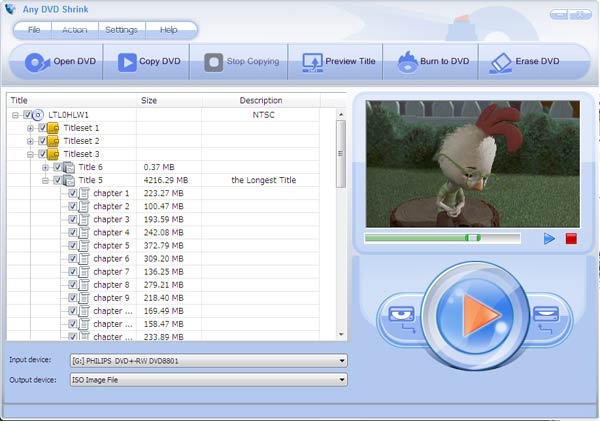
Any DVD Shrink is a easy-to-use yet powerful DVD backup tool for DVD movie. Any DVD Shrink performs a variety of functions, including DVD copying (also known as DVD cloning), DVD shrink, DVD burning, DVD erasing and creating DVD ISO image. Any DVD Shrink decodes DVD copy encryption like CSS, ArccOS and Region Code, offers features like 1:1 copy, automatic compression and episode selection, supports common used mediums including DVD-5, DVD-9, ISO image and DVD folder. With PAL and NTSC compatible DVD burning functions, Any DVD Shrink can burn ISO image and DVD folder to different disc types including single and dual layer discs which are playable on PC DVD players and standard DVD players with TV.
Any DVD Shrink gives users complete control to make DVD copies. You can choose to keep any titles, chapters, subtitles and languages of the original DVD. As long as you have Any DVD Shrink, you have a DVD decrypter, a DVD copier, a DVD cloner, a DVD burning tool and a DVD shrinker. Its an excellent choice for both beginners and advanced users.
Roman is not built in a day, so as ones DVD collection. People always take much time to choose a DVD movie they like and spend a substantial amount of money to build his DVD collection. It would be a big loss if the DVDs become scratched, damaged or unusable by various reasons. With Any DVD Shrink, you can make DVD copy or backup your DVD to different mediums easily and quickly, without worring about your amazing yet costly DVD collection scratched, damaged or unusable .
About Any DVD Shrink
This Rippers & Converters program is available in English. It was last updated on 29 September, 2026. Any DVD Shrink is compatible with the following operating systems: Windows.
The company that develops Any DVD Shrink is DVDSmith Inc.. The latest version released by its developer is 1.4.4.
The download we have available for Any DVD Shrink has a file size of 5.2 MB. Just click the green Download button above to start the downloading process. The program is listed on our website since 2015-11-09 and was downloaded 0 times. We have already checked if the download link is safe, however for your own protection we recommend that you scan the downloaded software with your antivirus. Your antivirus may detect the Any DVD Shrink as malware if the download link is broken.
How to install Any DVD Shrink on your Windows device:
- Click on the Download button on our website. This will start the download from the website of the developer.
- Once the Any DVD Shrink is downloaded click on it to start the setup process (assuming you are on a desktop computer).
- When the installation is finished you should be able to see and run the program.
Program Details
System requirements
Download information
Pricing
Version History
version 1.4.4
posted on 2015-11-09
1. Cancel the prompt message of finding main movie with VLC Media Player. 2. Fix the copy issue of some DVD movies.
version 1.17
posted on 2009-06-11
Minor bug fixes
Disclaimer
External Download
We do not host Any DVD Shrink on our servers. We did not scan it for viruses, adware, spyware or other type of malware. This app is hosted by the software publisher and passed their terms and conditions to be listed there. We recommend caution when installing it.
The external download link for Any DVD Shrink is provided to you by apps112.com without any warranties, representations or guarantees of any kind, so access it at your own risk.
If you have questions regarding this particular app contact the publisher directly. For questions about the functionalities of apps112.com contact us.
